9 minutes
Building WikiVisage: Active Learning for Wikimedia Commons
Wikimedia Commons has over 100 million freely licensed media files. A lot of these are photographs of people, politicians, artists, scientists, and athletes, but most of them lack structured metadata saying who is actually in the picture. That metadata is called Structured Data on Commons (SDC), and the specific property is P180 (depicts).
Without it, finding “all photos of Douglas Adams” means someone has to manually tag every single one. There are millions of images that need this. I wanted to see if I could make that process faster.
I built WikiVisage to make that process faster. It’s an active learning tool that uses face recognition to help users classify faces in Commons images, builds a lightweight classifier from their input, and then writes the results back as structured data. It’s open source, hosted on Wikimedia Toolforge, and available at wikivisage.toolforge.org. Anyone with a Wikimedia account can use it.
The idea
The core idea is simple: instead of asking someone to go through thousands of images manually, you show them a few faces and ask “Is this the person?” After enough yes or no answers, the system can classify the rest.
This is called active learning, a human provides a small amount of labeled data, and the model uses that to classify the remaining unlabeled data. For face recognition, it works surprisingly well because you only need a handful of confirmed matches (five, by default) before the model can take over.
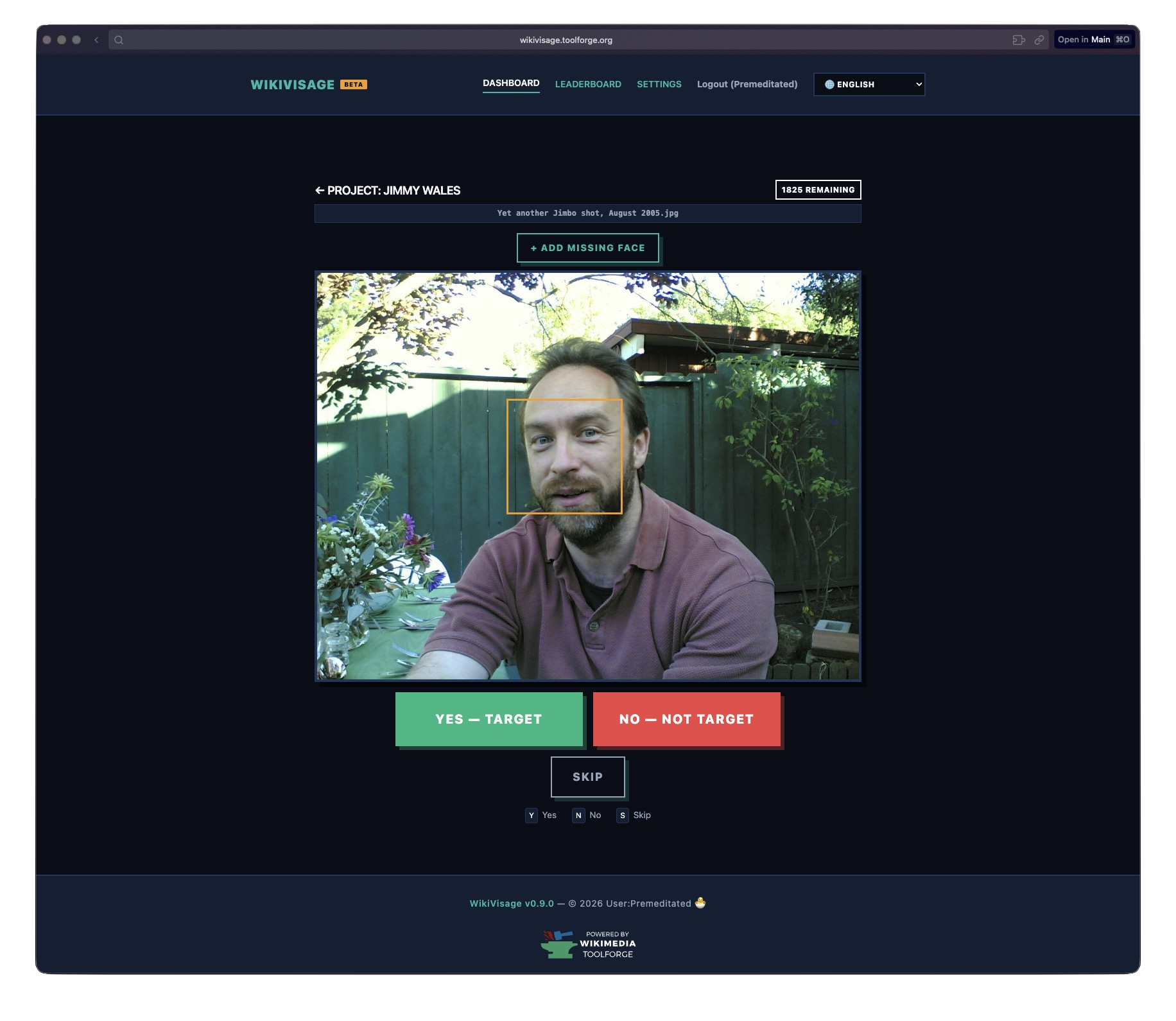
The classification UI. Yes, No, Skip, or draw your own bounding box if the detector missed a face. License: Joi Ito, CC-BY-2.0 (image).

How it works
When you create a project, you give it two things: a Wikidata Q-ID (the person you’re looking for) and a Commons category (where to find images). From there, the system takes over.
Step 1: Crawl and detect
A background worker crawls the Commons category via the MediaWiki API, downloading images and running face detection on each one. I use dlib’s HOG-based detector. It’s not the most accurate detector out there, but it runs on CPU and doesn’t need a GPU, which matters on Toolforge.
Each detected face gets a 128-dimensional encoding, basically a numerical fingerprint of the face, stored in the database. The worker processes images in parallel, up to four at a time per project, with up to three projects running simultaneously.
Step 2: Bootstrap from existing data
Here’s a neat trick: before asking the user to classify anything, the system checks if Wikidata already has P180 depicts claims for the target person on any of the images. If it finds existing tags, it uses those faces as initial training data. This means that for well-known people who already have some SDC data, you might not even need to classify many faces manually.
Step 3: Classify
The user sees one face at a time and clicks Yes or No. Keyboard shortcuts (Y/N) make this fast. There’s also an Undo button in case you misclick, and a Skip for faces you’re not sure about. If the face detector missed someone, you can draw a bounding box manually.
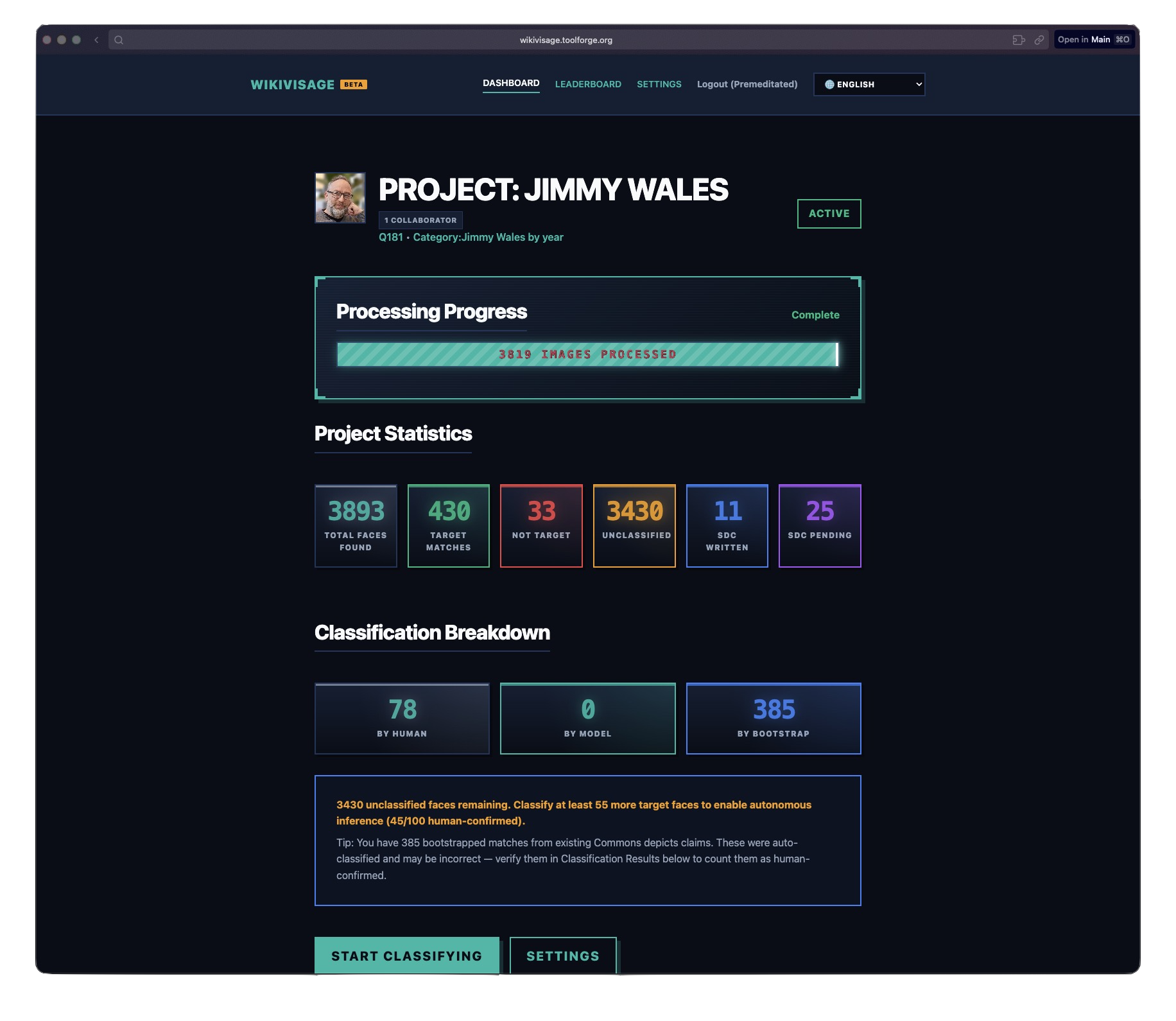
The project overview page showing classification progress and model results. License: ZMcCune (WMF), CC BY-SA 4.0 (image).

Step 4: Autonomous inference
Once you have enough confirmed matches, at least five target faces by default, the model kicks in. It computes a centroid, the average encoding of all confirmed target faces, and measures the distance from every unclassified face to that centroid. If the distance is below the threshold, 0.6 by default, it’s classified as a match.
It’s a simple model. No neural networks, no fine-tuning, no training loop. Just centroid distance in 128D space. But for the specific problem of “is this the same person?” within a single project, it works really well.
Step 5: Review and write to Commons
After inference runs, you can review what the model classified. Approve correct matches, reject false positives, or redraw bounding boxes if they’re off. When you’re happy with the results, hit “Send Edits to Wikimedia Commons” and the system writes P180 depicts claims via the Wikibase API.
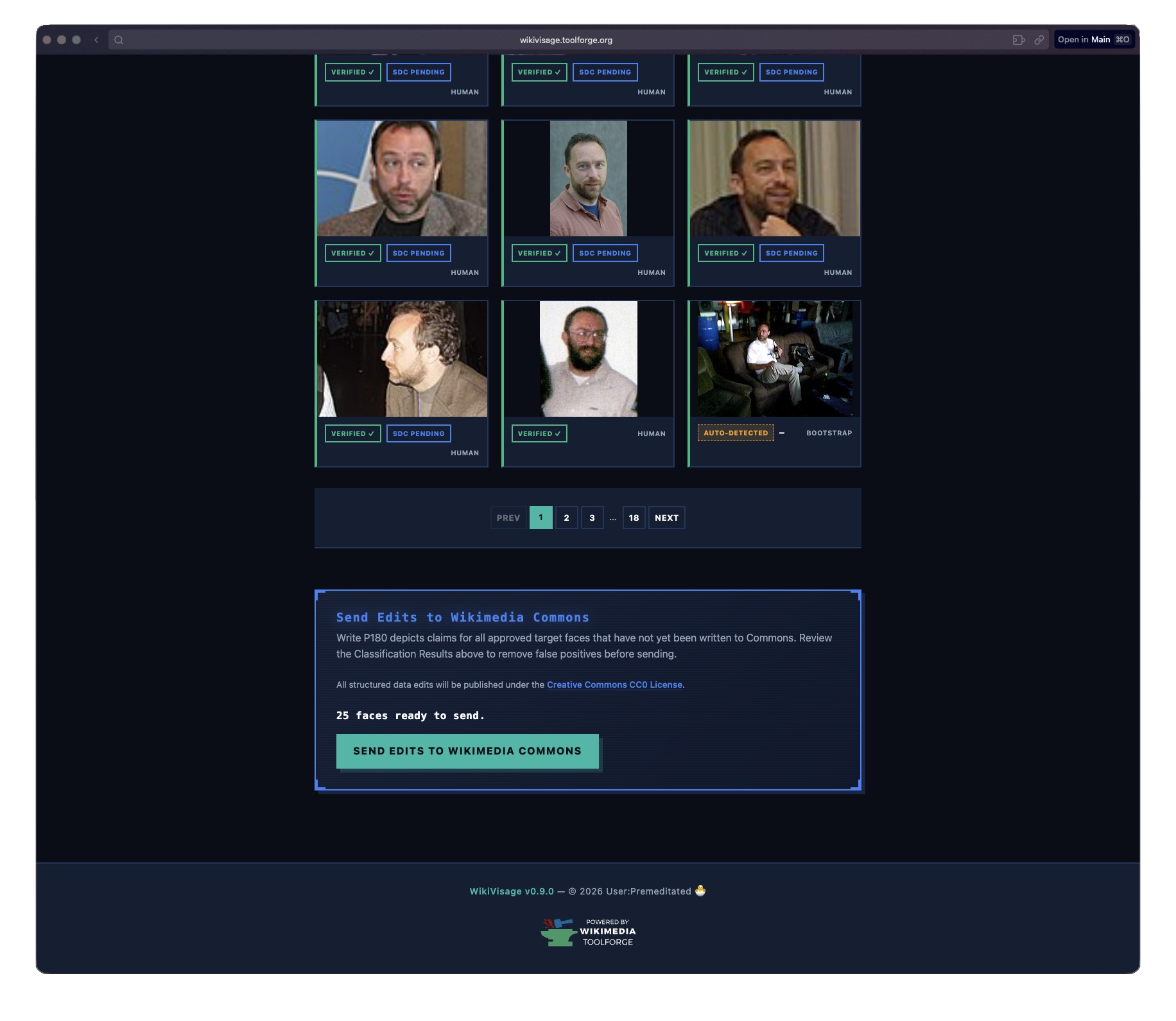
Model results gallery with approve, reject, and edit controls on each face. License, left to right: Henry Hui (CC BY-SA 3.0), Gus Freedman (CC BY-SA 2.5) x2, Seasurfer (CC BY-SA 3.0), EdwardOConnor (CC BY-SA 3.0), Sansculottem (CC BY-SA 3.0).

Architecture
WikiVisage runs as two processes sharing a MariaDB database:
+---------------------------+      +---------------------------+
|       Flask Web App       |      |  Background Worker(s)     |
|          (app.py)         |      |       (worker.py)         |
|---------------------------|      |---------------------------|
| OAuth 2.0 login           |      | Category traversal        |
| Project CRUD              |      | Image download            |
| Active learning UI        |      | HOG face detection (pool) |
| Classification API        |      | SPARQL bootstrapping      |
| Queue SDC writes          |      | Autonomous inference      |
| Approve/reject/edit bbox  |      | Write SDC claims          |
+------------+--------------+      +------------+--------------+
             |                                  |
             +----------------------------------+
                               |
                        +------------+
                        |   MariaDB  |
                        |  (ToolsDB) |
                        +------------+
The web app handles everything user-facing: OAuth login with Wikimedia, project management, the classification UI, and the API endpoints. The worker handles the heavy stuff: crawling categories, downloading images, running face detection, inference, and writing SDC claims.
They communicate through the database. When a user clicks “Send Edits to Wikimedia Commons,” the web app sets a flag on the project row. The worker picks it up on its next poll cycle and starts writing.
Running ML on Toolforge
Toolforge is Wikimedia’s free hosting platform for community tools. It runs on Kubernetes, which is great for web services but comes with constraints that make ML workloads interesting.
No GPU. Everything runs on CPU. That’s why I went with dlib’s HOG detector instead of a CNN-based approach. HOG is fast enough on CPU, and the encoding step (which converts a face crop into a 128D vector) is the only computationally expensive part.
Limited memory. Each worker pod gets 3 GiB of RAM. That sounds like enough, but dlib can be hungry. I added RLIMIT_AS (2 GiB) and RLIMIT_CPU (180s) limits on the face detection subprocess so a single bad image can’t take down the whole worker.
Tiny /dev/shm. This one bit me. Kubernetes pods get a 64 MB /dev/shm by default, and Toolforge doesn’t let you change it. Python’s multiprocessing.Queue uses POSIX semaphores backed by /dev/shm. After running for a few days, crashed subprocesses would leak semaphores, eventually filling up /dev/shm and crashing the entire worker with OSError: No space left on device.
The fix was replacing multiprocessing.Queue with per-worker multiprocessing.Pipe pairs. Pipes use kernel file descriptors (os.pipe()), not /dev/shm semaphores, so they can’t leak in the same way. Each face detection subprocess gets its own dedicated pipe, and the main process uses multiprocessing.connection.wait() to poll all pipes simultaneously.
Subprocess isolation. Face detection runs in a persistent subprocess pool, not in-process. This means if dlib segfaults on a corrupted image, and it does happen, only the subprocess dies. The worker restarts it and keeps going. Each subprocess is hardened with a preexec hook that scrubs the environment and sets resource limits before dlib ever loads.
Collaboration
WikiVisage supports multiple users working on the same project. The project owner can generate an invite code, and other users can join with it. Everyone’s classifications contribute to the same model, and there’s a leaderboard showing who has classified the most faces.
There’s also cross-project deduplication for SDC writes. If two different projects both want to write a P180 claim for the same person on the same Commons page, only one claim gets written. The first project to claim it wins (via INSERT IGNORE on a unique constraint), preventing duplicate edits on Commons.
What I learned
Building this taught me a few things:
Simple models can be enough. I started out thinking I’d need a proper ML pipeline with training, validation, and hyperparameter tuning. But centroid distance in encoding space is surprisingly effective for single-person recognition. The key is that the problem is narrowly scoped: you’re not building a general face recognizer, you’re asking “does this face belong to one specific person?” within a constrained set of images.
Toolforge is great but has sharp edges. The platform is generous, with free hosting and a free database. But the constraints are real. No GPU, small /dev/shm, no custom kernel parameters. You have to design around them, not fight them.
Writing to a public knowledge base is high-stakes. Every P180 claim WikiVisage writes goes to a real Wikimedia Commons page. That’s a live, public dataset used by Wikipedia and hundreds of other projects. Getting it wrong means polluting shared knowledge. That’s why the system requires explicit human approval before writing anything, and why SDC writes include maxlag compliance to be a good API citizen.
Future work
WikiVisage works, but the current architecture has clear limits. The centroid-distance model is simple and effective for easy cases, but it struggles with people who look very different across photos because of age, camera angle, or clothing. Everything also runs in-process on the worker, so there’s no model versioning, no A/B testing, and no way to swap in a better model without redeploying.
Scalable model serving with KServe on Lift Wing
The next step I’m exploring is moving model inference to Lift Wing, Wikimedia’s ML serving platform built on KServe. Instead of running face encoding and classification inside the worker process, the worker would call an inference endpoint that serves a proper model.
That would make a few practical improvements possible. It would let me use better embedding models, version them properly, and roll back if a new one performs worse. It would also make GPU inference possible for the encoding step. The worker would get simpler too, because it would just fetch images and call an API instead of managing a subprocess pool with dlib.
The architecture would look something like this: the worker downloads images, sends face crops to a KServe endpoint, gets back encodings, and then runs the classification logic. The model artifact lives in KServe, while the business logic stays in the worker.
Shared training data by QID
Right now, every project is an island. If three different users create projects for Q42 (Douglas Adams), each one starts from scratch. They each classify their own faces, build their own centroid, run their own inference. That’s wasteful.
The idea is to let users opt into sharing their face encodings keyed by Wikidata QID. If you classify 50 faces of Douglas Adams and mark them as shared, the next person who creates a Q42 project starts with 50 confirmed encodings instead of zero. The centroid is better from day one. The model needs fewer human classifications to reach high accuracy.
This would make WikiVisage less of a per-user tool and more of a shared resource. If people choose to share their encodings, later projects would start with better data instead of starting from zero every time. Because the data is keyed by QID, it would also connect naturally to the rest of Wikidata.
There are open questions around quality control (what if someone shares bad labels?), privacy (face encodings can’t reconstruct faces, but they are biometric data), and governance (who decides the data sharing policy?). These need proper RFC-style discussion with the Wikimedia community before building anything.
WikiVisage is open source on GitHub and live at wikivisage.toolforge.org. If you want to help tag people on Commons, try it out. If you want to contribute code, check the contributing guide.