9 minutes
My ‘Oh My Opencode’ Setup
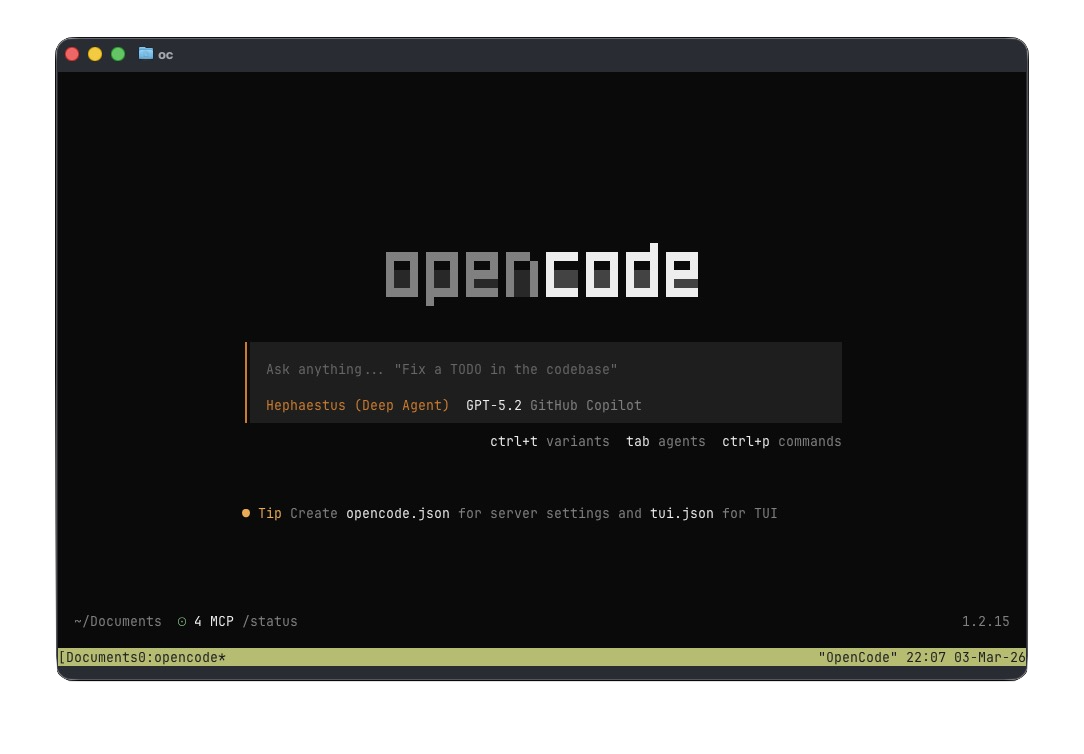
I’ve been bouncing between AI tooling lately: editor copilots, chat UIs, CLIs, agents, you name it. The thing I kept wanting was a repeatable setup that lives in a repo-friendly config file, works well on macOS, and still lets me use GitHub Copilot models.
This post is my current “oh-my-opencode” setup: Ghostty as the terminal, opencode as the driver, and GitHub Copilot (via MCP) as the model backend.
If you’re the kind of person who likes “dotfiles, but for agents”, this is for you.
What I’m Building
- A terminal-first workflow (fast, keyboard-driven)
- Multiple agents with explicit model + “variant” choices
- A permission system that’s strict by default but not annoying
- MCP access to GitHub so the agent can do real work
- Optional tmux layout so I can keep context visible
Prereqs (macOS)
I’m assuming:
- macOS + a terminal you like
- GitHub Copilot access enabled in your account
- You’re comfortable with JSON config files
For installs, I generally use Homebrew when possible:
brew --version
If opencode is distributed differently by the time you read this (it changes fast), follow their official install instructions and come back here for the configuration.
Terminal
👻 Ghostty
I like Ghostty because it feels lightweight and stays out of the way. It’s the “good ergonomics, no nonsense” terminal I’ve been looking for.

👻 Ghostty License: Unknown.
Small Ghostty tip: on Mac keyboards without Page Up/Down, scrolling is still doable. I mostly use trackpad scrolling, but when I’m in keyboard mode, I bind keys in Ghostty to scroll (page/line) so I don’t break flow.
Opencode
The whole setup revolves around two files:
opencode.json: opencode core settings (plugins, permissions, MCP)oh-my-opencode.json: “agent roster” + tmux + category routing
opencode.json
This is the “policy” file. It’s where I decide what the tool is allowed to do in my shell, what plugins are enabled, and which MCP servers it can talk to.
opencode.json
{
  "$schema": "https://opencode.ai/config.json",
  "plugin": [
    "oh-my-opencode@latest"
  ],
  "permission": {
    "bash": {
      "*": "ask",
      "sudo *": "deny",
      "npm *": "allow",
      "npm install *": "ask",
      "mvn *": "allow",
      "mvn install *": "ask",
      "nvm *": "allow",
      "npx *": "allow",
      "npx install *": "ask",
      "bun *": "allow",
      "bunx install *": "ask",
      "echo *": "allow",
      "./mvnw *": "allow",
      "./mvnw install *": "ask",
      "make *": "allow",
      "sqlfluff *": "allow",
      "cat *": "allow",
      "ls *": "allow",
      "head *": "allow",
      "tail *": "allow",
      "test *": "allow",
      "grep *": "allow",
      "true *": "allow",
      "which *":"allow",
      "find *": "allow",
      "mkdir *": "allow",
      "sort *": "allow",
      "sed *": "allow",
      "tee *": "allow",
      "base64 *": "allow",
      "ps *": "allow",
      "wc *": "allow",
      "jq *": "allow",
      "rg *": "allow",
      "jar tf *": "allow",
      "jar xf *": "allow",
      "javap *": "allow",
      "printf *": "allow",
      "rm -rf*": "ask",
      "az *": "ask",
      "gh *": "allow",
      "gh *delete*": "deny",
      "gh *DELETE*": "deny",
      "gh *Delete*": "deny",
      "gh org *": "deny",
      "gh secret *": "deny",
      "acli *": "allow",
      "acli *delete*": "deny",
      "acli *DELETE*": "deny",
      "acli *Delete*": "deny"
    },
    "external_directory": "ask",
    "doom_loop": "ask"
  },
  "mcp": {
    "github": {
      "type": "remote",
      "url": "https://api.githubcopilot.com/mcp/",
      "enabled": true,
      "headers": {
        "Authorization": "Bearer {file:./secrets/github-mcp-pat}"
      }
    }
  },
  "share": "disabled",
  "lsp": {
    "kotlin-ls": {
      "command": ["kotlin-lsp", "--stdio"],
      "extensions": [".kt", ".kts"]
    },
    "kotlin-lsp": {
      "command": ["kotlin-lsp", "--stdio"],
      "extensions": [".kt", ".kts"]
    },
    "markdown": {
      "command": ["marksman", "server"],
      "extensions": [".md"]
    },
    "jsonnet": {
      "command": ["jsonnet-language-server", "--stdio"],
      "extensions": [".jsonnet", ".libsonnet"]
    },
    "yaml": {
      "command": ["yaml-language-server", "--stdio"],
      "extensions": [".yaml", ".yml"]
    },
    "postgres": {
      "command": ["postgres-language-server", "lsp-proxy", "--stdio"],
      "extensions": [".sql", ".pgsql"]
    }
  },
  "command": {
    "create-pr": {
      "template": "Create a draft PR for the changes in the current branch. The PR should be created against the main branch. The PR title should be a concise summary of the changes, and the PR description should include a detailed explanation of the changes, the reasoning behind them, and any relevant context. If there are any specific areas of the code that require attention or review, please highlight them in the description.",
      "description": "Create a draft PR for the current branch"
    },
    "review-code": {
      "template": "Ask @oracle to do a code review. Create an actionable plan with your recommendations and suggestions based on the findings. Ask for my feedback and approval before updating any code based on the plan.",
      "description": "Do a code review with @oracle"
    },
    "review-pr-comments": {
      "template": "Use the receiving-code-review skill to review PR comments. IMPORTANT: Ask for feedback and approval before updating any code based on the received reviews. IMPORTANT: Always reply on the PR comment thread for all comments received AFTER feedback and approval and any fixes have been implemented.",
      "description": "Review PR comments"
    },
    "review-pr": {
      "template": "Ask @oracle to review the code introduced in PR $1. If any actionable issues are found, add one comment to the PR for each issue with a summary and possible discussion points for the PR author. When adding comments, always try to add them to the correct line(s) in the PR code diff.",
      "description": "Review PR"
    }
  }
}
Notes on permissions
My default is: ask on everything, then allow the boring read-only stuff.
"*": "ask"is the “seatbelt”. It stops the model from doing something clever-but-wrong while I’m half-paying attention.- I explicitly deny
sudoand the obvious “oops” commands. - I allow
cat,ls,rg,jq, etc. because those are basically just looking. - I keep package installs as
askeven if the ecosystem command itself is allowed (npm install,mvn install, etc.).
The best part is you can tune this as you learn where your personal risk tolerance is.
MCP: GitHub Copilot
This bit is the reason I’m writing the post.
"mcp": {
  "github": {
    "type": "remote",
    "url": "https://api.githubcopilot.com/mcp/",
    "enabled": true,
    "headers": {
      "Authorization": "Bearer {file:./secrets/github-mcp-pat}"
    }
  }
}
I keep the token out of the config and in a file under ./secrets/.
Practical checklist:
- Create a personal access token (PAT) that works for your needs.
- Put it in
secrets/github-mcp-pat(no newline if you can help it). - Add
secrets/to.gitignore.
If you’ve ever accidentally committed a token once, you only need to learn that lesson a single time.
LSPs (optional, but great)
I like having language servers available even in agent workflows. It’s the difference between “best effort guessing” and “the tool actually understands my YAML/Markdown/SQL/Kotlin”.
If an LSP binary isn’t installed, opencode won’t magically fetch it. On macOS I install these via Homebrew / npm depending on the server.
oh-my-opencode.json
This is the fun one. It’s where I define who my agents are and what kind of tasks they handle.
oh-my-opencode.json
{
  "$schema": "https://raw.githubusercontent.com/code-yeongyu/oh-my-opencode/dev/assets/oh-my-opencode.schema.json",
  "agents": {
    "sisyphus": {
      "model": "github-copilot/claude-opus-4.6",
      "variant": "max"
    },
    "oracle": {
      "model": "github-copilot/gpt-5.2",
      "variant": "high"
    },
    "librarian": {
      "model": "github-copilot/claude-sonnet-4.5"
    },
    "explore": {
      "model": "github-copilot/gpt-5-mini"
    },
    "multimodal-looker": {
      "model": "github-copilot/gemini-3-flash-preview"
    },
    "prometheus": {
      "model": "github-copilot/claude-opus-4.6",
      "variant": "max"
    },
    "metis": {
      "model": "github-copilot/claude-opus-4.6",
      "variant": "max"
    },
    "momus": {
      "model": "github-copilot/gpt-5.2",
      "variant": "medium"
    },
    "atlas": {
      "model": "github-copilot/claude-sonnet-4.5"
    }
  },
  "tmux": {
    "enabled": true,
    "layout": "main-vertical",
    "main_pane_size": 50,
    "main_pane_min_width": 100,
    "agent_pane_min_width": 60
  },
  "categories": {
    "visual-engineering": {
      "model": "github-copilot/gemini-3.1-pro-preview",
      "variant": "high"
    },
    "ultrabrain": {
      "model": "github-copilot/gemini-3.1-pro-preview",
      "variant": "high"
    },
    "artistry": {
      "model": "github-copilot/gemini-3.1-pro-preview",
      "variant": "high"
    },
    "quick": {
      "model": "github-copilot/claude-haiku-4.5"
    },
    "unspecified-low": {
      "model": "github-copilot/claude-sonnet-4.5"
    },
    "unspecified-high": {
      "model": "github-copilot/claude-sonnet-4.5"
    },
    "writing": {
      "model": "github-copilot/gemini-3-flash-preview"
    }
  }
}
Why multiple agents?
I used to keep “one good model” and call it a day. That works… until it doesn’t.
Different tasks want different tradeoffs:
- “Search the repo and summarize what you find” wants speed and low cost.
- “Make a multi-file refactor and don’t break anything” wants careful reasoning.
- “Write text that sounds like a human who’s been burned by production” wants a writing-leaning model.
So I split the roles and named them. The names are silly, but the effect is real: I’m more deliberate about which agent I’m asking.
Agents vs skills (the mental model)
This is the distinction that made the whole setup “click” for me:
- Agents are people (or at least personas): a named model + variant + a set of expectations.
- Skills are moves: repeatable procedures you can invoke without rewriting the same prompt every time.
If you’ve ever had a model do a great code review once and then completely forget what “good review” means the next day, you already understand why skills matter.
I treat agents like specialists (explore, review, write), and skills like the playbook they execute.
Skills in practice: commands and prompt templates
In my config, I implement “skills” in two places:
- Custom commands in
opencode.json
These are basically pinned prompts with a name.
create-pris my “make a draft PR with a decent description” skill.review-codeis my “ask an agent for a review plan, don’t touch code yet” skill.review-pris my “review PR $1 and leave actionable comments” skill.
The important part isn’t the text itself—it’s that I can re-run the same workflow across repos and get consistent output.
- Referenced skills inside prompts
Notice this template line:
“Use the receiving-code-review skill to review PR comments …”
That’s the same idea: name the move. In practice it means the agent should follow a specific routine when consuming feedback (summarize, propose fixes, ask approval, then reply on the thread).
Routing: categories as a lightweight skill selector
The categories section in oh-my-opencode.json is another way of making skills real.
I can label a task as quick or writing and the system routes it to a model that’s a better fit.
That doesn’t magically guarantee quality—but it reduces the odds that I ask a “fast” model to do “slow” work.
tmux layout
When tmux is enabled, I like a main vertical layout so I can keep:
- one pane for my shell / repo
- one pane for the agent output
It’s a small thing, but it prevents the “scroll up, lose your place, forget what the model suggested” loop.
A Quick Sanity Check
Once the configs are in place, I do a couple of boring checks:
- Run a safe command (
ls,rg,cat) and confirm it doesn’t prompt. - Run a risky command (
rm -rf ...) and confirm it does prompt. - Trigger something that needs GitHub MCP and confirm auth works.
If something fails, it’s almost always:
- PAT missing/invalid
- PAT file path wrong
secrets/accidentally committed/ignored incorrectly
Day-to-day Workflow
My baseline loop is:
- Ask an agent to explore and summarize
- Ask a “careful” agent to propose a plan
- Approve changes incrementally
- Keep permissions tight so I can trust the tool
This is also why I keep share disabled. I treat my terminal agent like a coworker sitting at my keyboard.
Vibe Code
This section is intentionally unfinished. I’m still figuring out what I want “vibe coding” to mean when the tooling is actually capable of touching the repo.
The current rule is simple: vibe is fine, but only after the boring safety rails are in place.